


Picasa is still worth it, and here's why
Picasa, a once-renowned image organization and editing software developed by Google, has left an indelible mark in the digital image sphere. Although officially discontinued in 2018, this software still remains available for download, offering users the opportunity to experience its intuitive interface and image management features offline.
Top Recommended Alternative
Picasa's allure lies in its simplicity and efficiency. Users can effortlessly organize their photo libraries, create albums, and perform basic editing tasks such as cropping, color correction, and red-eye reduction. Here is everything you need to know about Picasa.
Elevate your photo editing sessions
Picasa was a versatile and user-friendly photo management and editing software developed by Lifescape, and acquired by Google in 2004. It provided a range of features to organize, edit, and share digital photos on Windows and macOS platforms. Its primary features included:
- Image organization: Picasa allowed users to organize their photo collections by creating albums, sorting by date, and adding tags to easily locate specific images.
- Basic editing tools: Users could perform basic photo edits like cropping, color correction, red-eye reduction, and adding filters to enhance images.
- Facial recognition: A standout feature was its ability to recognize faces in photos and suggest tags, making it easier to identify individuals in large photo libraries.
- Integration with Web Albums: Picasa seamlessly integrated with Google's Web Albums, enabling users to upload and share their photos online.
- User-friendly interface: The software boasted a straightforward and intuitive interface, making it accessible for users with varying levels of technical expertise.
Is Picasa a free software?
Yes, Picasa was a free software provided by Google for managing, editing, and sharing digital photos. Users could download and use Picasa without any initial cost.
The software's free availability contributed to its popularity among users who sought a user-friendly and cost-effective solution for managing their digital photo libraries.
Is Picasa still available?
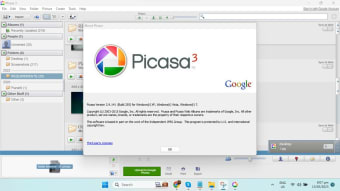
Although it is now discontinued, Picasa is still available to download and use offline. Picasa was created by a company named Lifescape in 2002. In July 2004, Google acquired Picasa and began offering it as freeware. In February 2016, however, Google announced it was discontinuing support for Picasa Desktop and Web Albums. Picasa Web Albums, a companion service, was closed in May 2016.
Despite this, Picasa is still available and continues to work anywhere it's already installed. It is fully compatible with Windows 10, although there won't be any new updates made. Picasa software no longer works online, however, so you will not be able to add or sync albums or individual photos. Picassa is also available for Mac.
While Picasa itself is no longer receiving updates or official support, Google Photos emerged as its successor, integrating many of Picasa's features into its online platform. Google Photos offers cloud-based photo storage, organization, and basic editing tools. Users who enjoyed Picasa's functionalities might find similarities in Google Photos.
Picasa alternatives
Despite its discontinuation, Picasa remains a nostalgic favorite for users who appreciated its straightforward approach to photo management and editing. However, its lack of continued support means it may not be the best choice for users seeking modern features or ongoing updates.
As an alternative to Picasa, Google recommends using their Google Photos service to create albums, share photos, edit photos, and search your photos.
There are also other alternatives to Picasa. Fotobounce does a decent enough job for a simple photo organizer, although its interface isn't very user-friendly. FastStone Image Viewer is both an image viewer and editor, although it lacks Picasa's top-notch editing functionality. Ribbet Photo Editor provides intuitive photo editing services across platforms.
IrfanView allows for the robust viewing of images and the editing (and batch editing) of photos, while ACDSee is an image organizer, viewer, and image editor program.
For those who want more powerful photo editing, Adobe Photoshop is one of the world's most advanced and popular image editors. Adobe Photoshop Lightroom, meanwhile, is simpler and easier to use but still features advanced tools.
What can I do with Picasa?
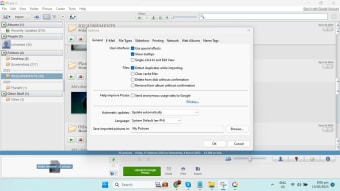
Downloading and installing Picasa is easy using the Windows installer. Upon launching the program, users can choose where Picasa imports pictures from on their PC: select to either search through only My Documents, My Pictures, and the Desktop, or search the whole computer.
At this stage, you can also opt-in to use the Picasa Photo Viewer to view photos directly from Windows Explorer. The viewer can open various file types including .jpg, .bmp, .gif, .png, .tga, .tif and .TIFF, .webp, and .raw extensions.
Picasa also lets you select the drive and folders to scan and allows you to synchronize automatically each time you open up the software. You don't have to import new pictures manually.
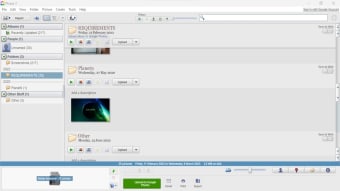
Once your photos have been added to Picasa, they are organized into albums appearing in folders with the same names from which they were taken. You can reorganize and move photos from one location to another by simply dragging and dropping.
Picasa also lets you add tags to your pictures so that you can sort them easily, including the location where the photos were taken (although this has to be inputted manually nowadays). You're also able to tag the people in the photos so that you can easily find them.
Picasa's interface is fairly basic and looks quite boxy and old-fashioned now. You can change how photos are displayed and switch easily between Library View and Edit View (found under the View menu). Tabs within the interface separate different projects from the library and import sections.
Why Picasa still runs today
Even though Google officially discontinued support for Picasa in 2016, the desktop application continues to work for users who already have it installed. According to Google’s official retirement announcement, while there will be no future updates or development, the program will continue to function “as it does today,” meaning basic photo organizing and editing features can still be used offline without active support or patches.
Availability of older versions for different devices
For users encountering compatibility issues with newer operating systems, older versions of the program can still be found in reputable software archives. Sites like Uptodown host multiple previous Picasa builds—including versions from 2011 through 2023—allowing users to try different installers that may work better on specific Windows systems. These archived versions can be helpful when the latest release doesn’t run smoothly on older or newer machines.
How Picasa fits into your workflow today
Although Picasa no longer syncs online or receives feature updates, many long-time users still value it for local photo organization and quick editing. Recent user discussions confirm that people continue to use it as a lightweight tool for managing extensive image libraries without cloud dependencies. For those who prefer desktop-centered workflows—such as sorting by folders, tagging people manually, and quick batch edits—it remains a useful offline option years after its official retirement.
Legacy support through community resources
Former community contributors have maintained helpful resources and guidance long after official support ended. Websites created by “Picasa Top Contributors” offer FAQs, installation tips, and advice about transitioning to alternatives like Google Photos, which can help users deal with the gaps left by the discontinued service. These community efforts provide support for legacy users who want to preserve their established photo libraries or understand how to migrate metadata into modern tools.
Should you download Picasa?
If you're seeking a nostalgic experience or only require basic photo organization and editing for smaller image collections, downloading Picasa for offline use still serve that purpose. However, for a more comprehensive and updated experience, exploring newer alternatives like Google Photos would likely provide a more robust solution with modern features and ongoing support.